
Tags Usage
The original intention of smart-doc is to remove the intrusion of annotations by using javadoc document comments. Therefore, every additional function of smart-doc is to consider the native tags of javadoc. The following is an introduction to some javadoc tags used by smart-doc. .
| tag name | description |
|---|---|
| @param | For the Spring Boot interface layer, for simple type parameters, you must write a comment description when using @param, and for Entity type smart-doc, it will not be checked. |
| @deprecated | Can be used in comments to mark that the interface is obsolete, and the effect is the same as the @Deprecated annotation |
| @apiNote | @apiNote is a new document tag for java, smart-doc uses @apiNote as a detailed description of the method, so you can use apiNote to write a long note. If a method does not write @apiNote annotation description, smart-doc directly uses the method default annotation to fill in |
javadoc Usage
1.1 @param Special usage
smart-doc adds some special usages for java native @param.
- Set mock values for basic type request parameters
/**
 * Test @RequestParam
 *
 * @param author author|Bob
 * @param type   type
 */
@GetMapping("testRequestParam")
public void testRequestParam(@RequestParam String author, @RequestParam String type) {

}
The author's mock value is added after the | symbol above Bob
- Parameter object substitution
For example, some objects have been specially processed at the bottom of the framework. Smart-doc relies on the original parameter object. The document after analysis and processing may not meet the requirements. In this case, you can define a parameter object to replace it, and then smart-doc will follow you Specify the object to output the document.
For example: when using jpa's Pageable as an interface parameter to receive an object, the spring framework handles it. The actual attribute is PageRequest, but if smart-doc uses PageRequest, it will push out some unnecessary attributes. This function is from smart-doc 1.8 .5 Available now.
/**
 * Parametric object replacement test
 * @param pageable com.power.doc.model.PageRequestDto
 * @return
 */
@PostMapping(value = "/enum/resp")
public SimpleEnum resp(@RequestBody Pageable pageable){
    return null;
}
In the above writing method, smart-doc will use com.power.doc.model.PageRequestDto instead of jpa's Pageable for document rendering. Note that the class name must be the full class name. Let's look at the writing methods supported by smart-doc.
@param pageable com.power.doc.model.PageRequestDto
@param pageable Your comment|com.power.doc.model.PageRequestDto
# smart-doc itself is based on generic derivation, if you need generics, you need to write specific objects
@param pageable com.power.doc.model.PageRequestDto<com.power.doc.model.User>
Try to use this form of parameter substitution as little as possible. It is very inconvenient to write code. It is recommended to directly define objects as input parameters.
Custom doc tags
There are relatively few native Javadoc tags in Java, which cannot meet some usage scenarios, so smart-doc has customized some doc tags. The following is a description of the use of custom doc tags.
| tag name | description |
|---|---|
| @ignore | ignore tag is used to filter a certain field on the request parameter object. After setting, smart-doc will not output the changed field to the request parameter list. Please refer to Ignore Response Field for the ignore of response fields. If ignore is added to the method , The interface method will not be output to the document. Starting from 1.8.4, ignore support is added to the controller to ignore interface classes that do not want to generate documents. Ignore can also be used to ignore a request parameter in a method. |
| @mock | @since smart-doc 1.8.0, mock tag is used to set custom document display value in the basic object type field. After setting the value, smart-doc will no longer help you generate random values. It is convenient to directly output delivery documents through smart-doc. |
| @dubbo | @since smart-doc 1.8.7, dubbo tag is used to add to the dubbo api interface class so that smart-doc can scan to the dubbo rpc interface to generate documentation. |
| @restApi | @since smart-doc 1.8.8, restApi tag is used to support smart-doc to scan Spring Cloud Feign's defined interface to generate documentation. |
| @order | @since smart-doc 1.9.4, order tag is used to set the custom sorting sequence number of the controller interface or api entry, @order 1 means setting the sequence number to 1. |
| @ignoreResponseBodyAdvice | @since 1.9.8, ignoreResponseBodyAdvice tag is used to ignore the wrapper class set by ResponseBodyAdvice. |
| @download | @since smart-doc 2.0.1, the download tag is used to mark the file download method of the controller, and the file download test can be realized when the debug page is generated. And it supports to download the file with request header parameter test. |
| @page | @since smart-doc 2.0.2, the page tag is used to mark the controller method to indicate that the method is used to render and return a static page. If a test is initiated when the debug page is generated, the test page will automatically be opened in the browser. Label display page. |
| @ignoreParams | @since smart-doc 2.1.0, ignoreParams tag is used to mark the parameters that do not want to be displayed in the document on the controller method, for example: @ignoreParams id name, multiple parameter names are separated by spaces |
| @response | @since smart-doc 2.2.0, the response tag is marked on the controller method to allow you to define the returned json example by yourself. It is recommended to use it only when returning basic types, such as: Result<String> This generic type is a response of a simple primitive type. |
| @tag | @since 2.2.5, @tag is used to classify controller methods. You can assign methods under different controllers to multiple categories, and you can also directly assign controllers to one category or multiple categories. |
| @extension | @since 3.0.3, @extension is marked on the controller method. it's used to support the extension feature of OpenApi. it will add a "x-*" attribution for openapi.json |
2.1 @ignore use (deprecated using on field since 2.6.9) 2.6.9
The @ignore annotation can only be applied to methods or classes, not on fields. Use the @JsonIgnore annotation from the JSON library for instead. Cause using @ignore on a field doesn't actually prevent it from being returned.
/**
* Here's an early version of the wrong demonstration
*/
public class SubUser {

    /**
     * user name
     */
    private String subUserName;

    /**
     * ID card
     */
    private String idCard;

    /**
     * gender
     */
    @JsonIgnore
    private int gender;

    /**
     *  createTime
     *  @ignore
     */
    private Timestamp createTime;
}
In the future, @ignore will only be used in method and class comments.
For entity fields, it is recommended to use the Json Transformation Framework's annotations to ignore them. The use of @ignore on fields is an early mistake demonstrated by smart-doc, and the ability of @ignore to ignore fields will be taken down in future releases. Jackson and Fastjson annotations are supported by smart-doc, and it is not officially recommended to use this approach, which fails to achieve consistency in presentation and behavior.
In the Controller layer, use SubUser as a parameter to receive, and the parameter request document output by smart-doc:
| Parameter | Type | Description | Required |
|---|---|---|---|
| subUserName | string | user name | false |
| idCard | string | ID card | false |
| gender | int | gender | false |
2.2 @mock use
public class SimpleUser {

    /**
     * user name
     * @mock Bob
     * @since v1.0
     */
    @NotNull
    private String username;

    /**
     * password
     * @mock 12356
     * @since v1.0
     */
    private String password;
}
In the Controller layer, SimpleUser is used as a parameter to receive, and smart-doc no longer uses random values. Example of parameter request output by smart-doc:
{
  "username": "Bob",
  "password": "12356"
}
2.3 @download use
Used to tell smart-doc. One of the methods in your controller is the file download interface. When smart-doc generates a debug page, it can generate a file download request. The background reference code is as follows:
/**
 * BaseController
 *
 * @author yu on 2020/11/28.
 */
public abstract class BaseController {

    private static final Logger LOGGER = LoggerFactory.getLogger(BaseController.class);

    /**
     * excel file
     */
    public static final String EXCEL_CONTENT_TYPE = "application/vnd.ms-excel;charset=utf-8";

    /**
     * text
     */
    public static final String TEXT_CONTENT_TYPE = "application/octet-stream;charset=utf-8";

    /**
     * Export excel, you need to add the suffix when adding the file name
     *
     * @param fileName fileName(userInfo.xls)
     * @param response HttpServletResponse
     * @return ServletOutputStream
     * @throws Exception Exception
     */
    protected ServletOutputStream exportExcel(String fileName, HttpServletResponse response) throws IOException {
        return baseDownload(EXCEL_CONTENT_TYPE, fileName, response);
    }

    /**
     * Basic file download
     *
     * @param contentType Type of download file
     * @param fileName    fileName
     * @param response    response
     * @return ServletOutputStream
     * @throws IOException IOException
     */
    protected ServletOutputStream baseDownload(String contentType, String fileName, HttpServletResponse response)
            throws IOException {
        response.setContentType(contentType);
        response.setHeader(HttpHeaders.CONTENT_DISPOSITION, "attachment;filename="
                + new String(fileName.getBytes("gbk"), "iso-8859-1"));
        return response.getOutputStream();
    }

    /**
     * Download file
     *
     * @param fileName download file
     * @param response response
     * @return ServletOutputStream
     * @throws IOException IOException
     */
    protected ServletOutputStream downloadText(String fileName, HttpServletResponse response) throws IOException {
        return baseDownload(TEXT_CONTENT_TYPE, fileName, response);
    }

}
File download processing controller
/**
 * File download test
 *
 * @author yu 2020/12/14.
 */
@RestController
@RequestMapping("download")
public class DownloadController extends BaseController {
    private static final Logger LOGGER = LoggerFactory.getLogger(DownloadController.class);
    /**
     * Download normal files
     *
     * @param response
     * @return
     * @throws IOException
     * @download
     */
    @PostMapping("text/{id}")
    public void download(HttpServletResponse response) throws IOException {
        String randomStr = RandomUtil.randomNumbers(50);
        String fileName = "test.log";
        //To use the smart-doc debug page to test the file download, you must set the filename response header, otherwise, use other simulation tools to test.
        // urlDecode is used to process the file name
        response.setHeader("filename", urlEncode(fileName));// No need to set this since 2.0.2
        ServletOutputStream outputStream = this.downloadText(fileName, response);
        outputStream.write(randomStr.getBytes());
    }

    public String urlEncode(String str) {
        if (StringUtil.isEmpty(str)) {
            return null;
        } else {
            try {
                return java.net.URLEncoder.encode(str, "UTF-8");
            } catch (UnsupportedEncodingException e) {
                e.printStackTrace();
                return null;
            }
        }
    }
}
Smart-doc version 2.0.2 will automatically read the file name from the download response header
Content-Disposition: attachment; filename=xx, no longer need to setresponse.setHeader("filename", urlEncode() in the response header fileName));. Of course, even for Content-Disposition, remember to use urlEncode to process the file name, otherwise there will be garbled Chinese file names. If you directly use the browser to open the test page generated by the generated smart-doc, the content-disposition cannot be obtained in the test, but a random file name is generated. To verify the correctness, please visit the page through the service.
2.4 @page use
/**
 * arthas flame chart list
 *
 * @return
 * @page /arthas-output.html
 * @apiNote Return an arthas-output.html showing the flame graph file
 */
@GetMapping("arthas-output.html")
public String render() {
    Template template = BeetlTemplateUtil.getByName("arthas-output.tpl");
    List<FileInfo> files = FileUtil.getFilesFromFolder(environment.getProperty("arthas.output.path", OUTPUT_PATH));
    template.binding("path", "arthas-output");
    template.binding("fileInfoList", files);
    return template.render();
}
In this example, beetl is used to write an html template, and arthas-output.html is accessed under normal circumstances. It will return to the rendered interface. If you want to click on the request in the debug page to directly access the page, then you can use @page to tell smart-doc the name of your rendered page. In this way, you can directly open a new tab to access the page on the debug page.
2.5 @ignoreParams use
/**
 * testing time
 * @ignoreParams id
 * @param id id
 * @param dateEntity
 */
@PostMapping("data-date")
public CommonResult<DateEntity> test(int id,@RequestBody DateEntity dateEntity){
    return null;
}
Ignore the id parameter and do not display it in the document. This is mainly the user state parameter in the traditional stateful back-end management system.
2.6 @response use
/**
 * test response tag
 *
 * @return
 * @response {
 * "success": true,
 * "message": "success",
 * "data": "hello",
 * "code": "68783",
 * "timestamp": "2021-06-15 23:05:16"
 * }
 */
@GetMapping("/test")
public CommonResult<String> create() {
    return null;
}
Ignore the id parameter and do not display it in the document. This is mainly the user state parameter in the traditional stateful back-end management system.
2.7 @tag use
/**
 * json file config test
 * @tag dev
 * @author cqmike 2021-07-16 14:09
 **/
@RestController
public class ConfigRequestParamController {

    /**
     * get request test query param
     * @tag test
     * @author cqmike
     * @return
     */
    @GetMapping("configQueryParamGet")
    public void configQueryParamGet(String configQueryParam) {

    }

    /**
     * post request test query param
     *
     * @tag test
     * @author cqmike
     * @return
     */
    @PostMapping("configQueryParamPost")
    public void configQueryParamPost(String configQueryParam) {

    }
}
@tag is used to classify controller methods. You can assign methods under different controllers to multiple categories, and you can also directly assign controllers to one category or multiple categories.
2.8 @extension use 3.0.3
@extension is marked on the controller method. it's used to support the extension feature of OpenApi. it will add a "x-*" attribution for openapi.json
/**
 * json file config test
 * @tag dev
 * @author cqmike 2021-07-16 14:09
 **/
@RestController
public class ConfigRequestParamController {

    /**
     * get request test query param
     * @extension group ecs
     * @extension key1 ["v1","v2"]
     * @extension key2 {"x":"v1", "y":"v2"}
     * @tag test
     * @author cqmike
     * @return
     */
    @GetMapping("configQueryParamGet")
    public void configQueryParamGet(String configQueryParam) {

    }
}
it will add a "x-*" attribution for openapi.json
{
  "paths":{
    "/xxx/xxx": {
      "post": {
        "summary": "xxx",
        "tags": [
          ...
        ],
        "requestBody": {
          ...
        },
        "responses": {
        ...
        },
        "operationId": "xxx-POST",
        "x-group": "ecs",
        "x-key1": ["v1","v2"],
        "x-key2": {"x":"v1", "y":"v2"},
        "parameters": [
             ...
        ]
      }
    }
  }
}
IDEA custom tag prompt
The custom tag is not automatically prompted by default, and requires the user to set it in the idea. You can use it after setting it up. The following takes the setting of smart-doc custom mock tag as an example. The setting operation is as follows: 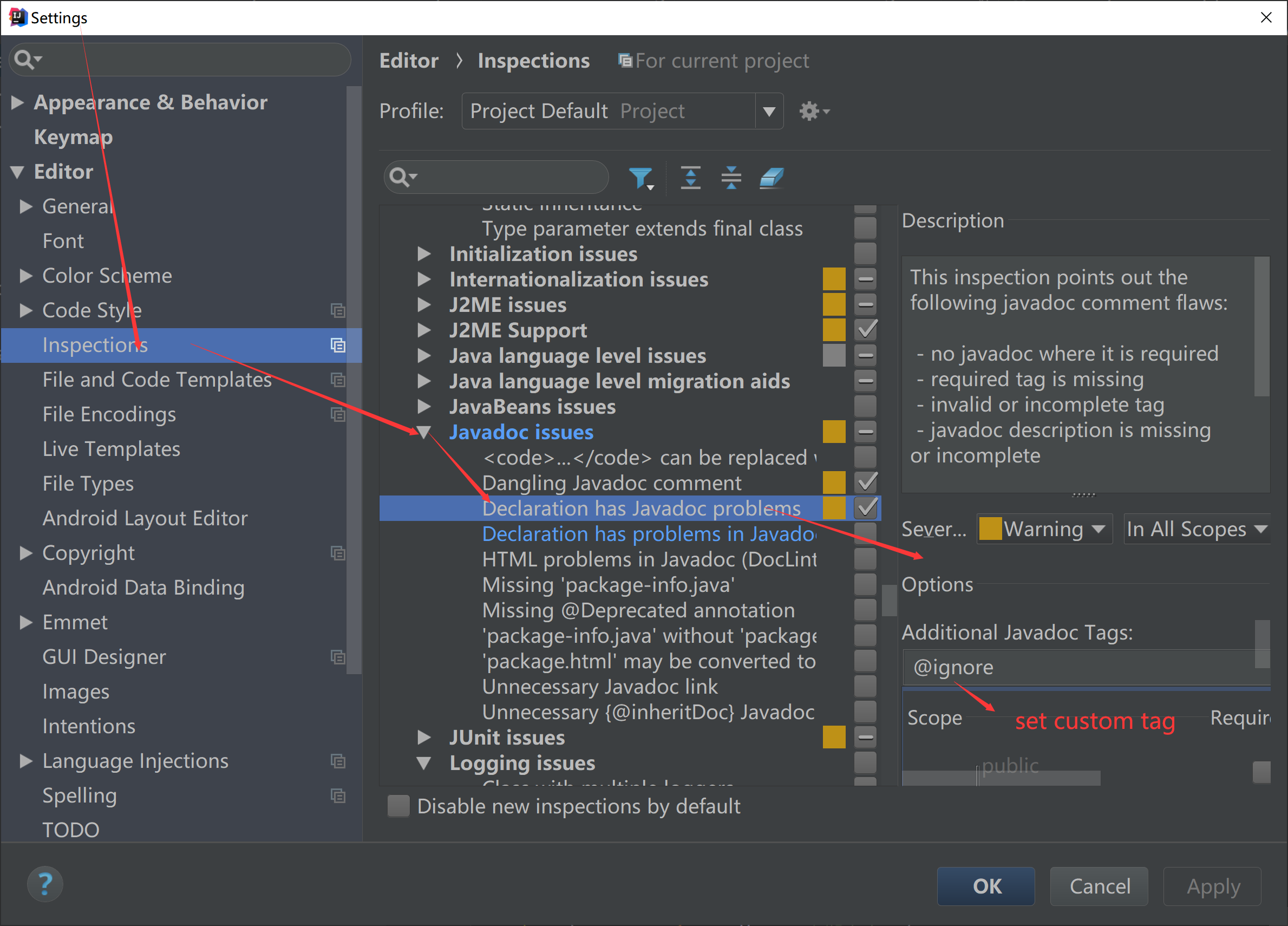
Users who use other development tools should find the custom tag prompt settings of related tools by themselves.